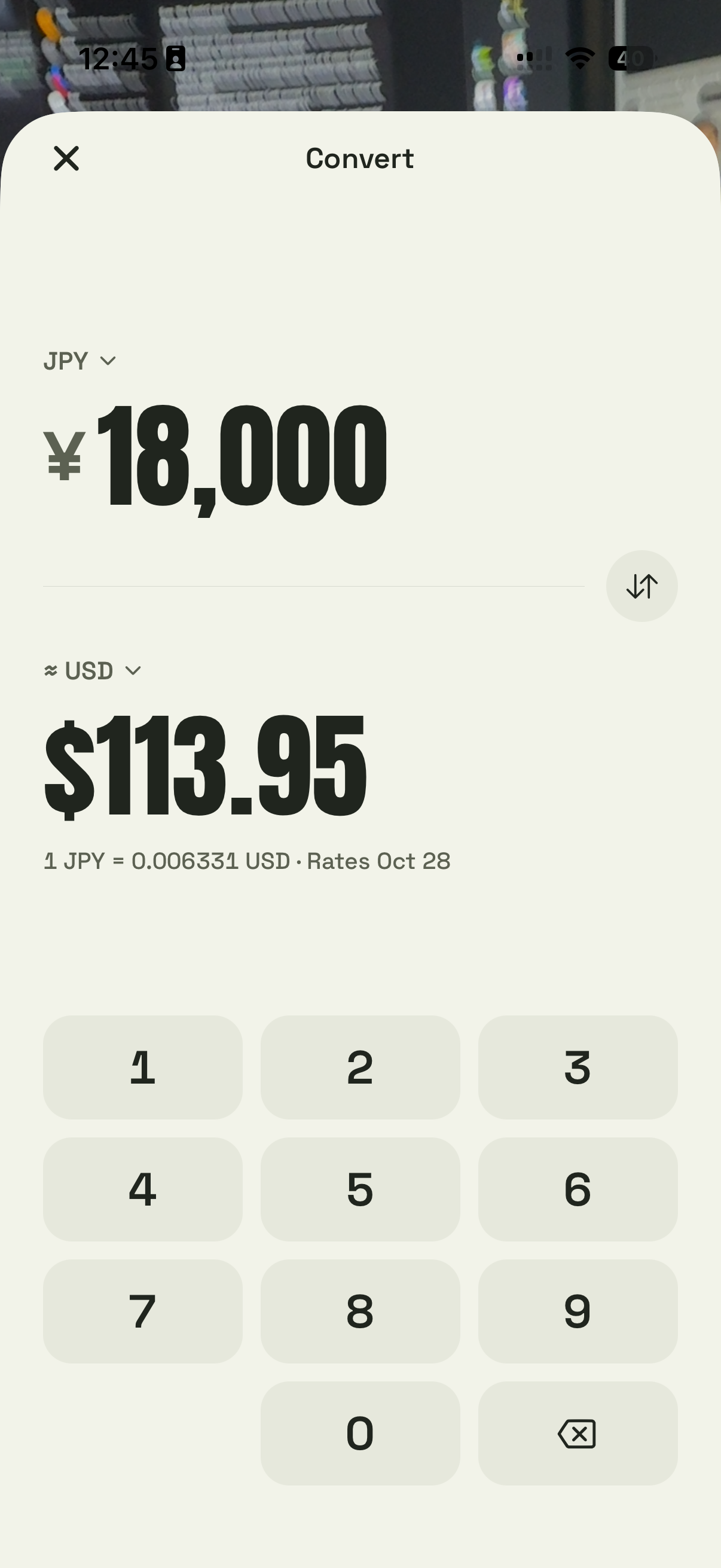
Type it. Get the estimate.
Use the keypad when a price is hard to scan. Change the amount or swap currencies.
Tap the screen to view it at full size.
Camera currency converter for iPhone and Android
Point at a price tag, menu price or receipt total. See an estimate in your home currency.
Free to scan. Requires iOS 16 or later, or Android 8.0 or later.
Kahei in the wild
Convert one price at a time. Choose the currencies for your trip, type an amount when you prefer, and revisit your recent scans.
Use the keypad when a price is hard to scan. Change the amount or swap currencies.
Tap the screen to view it at full size.
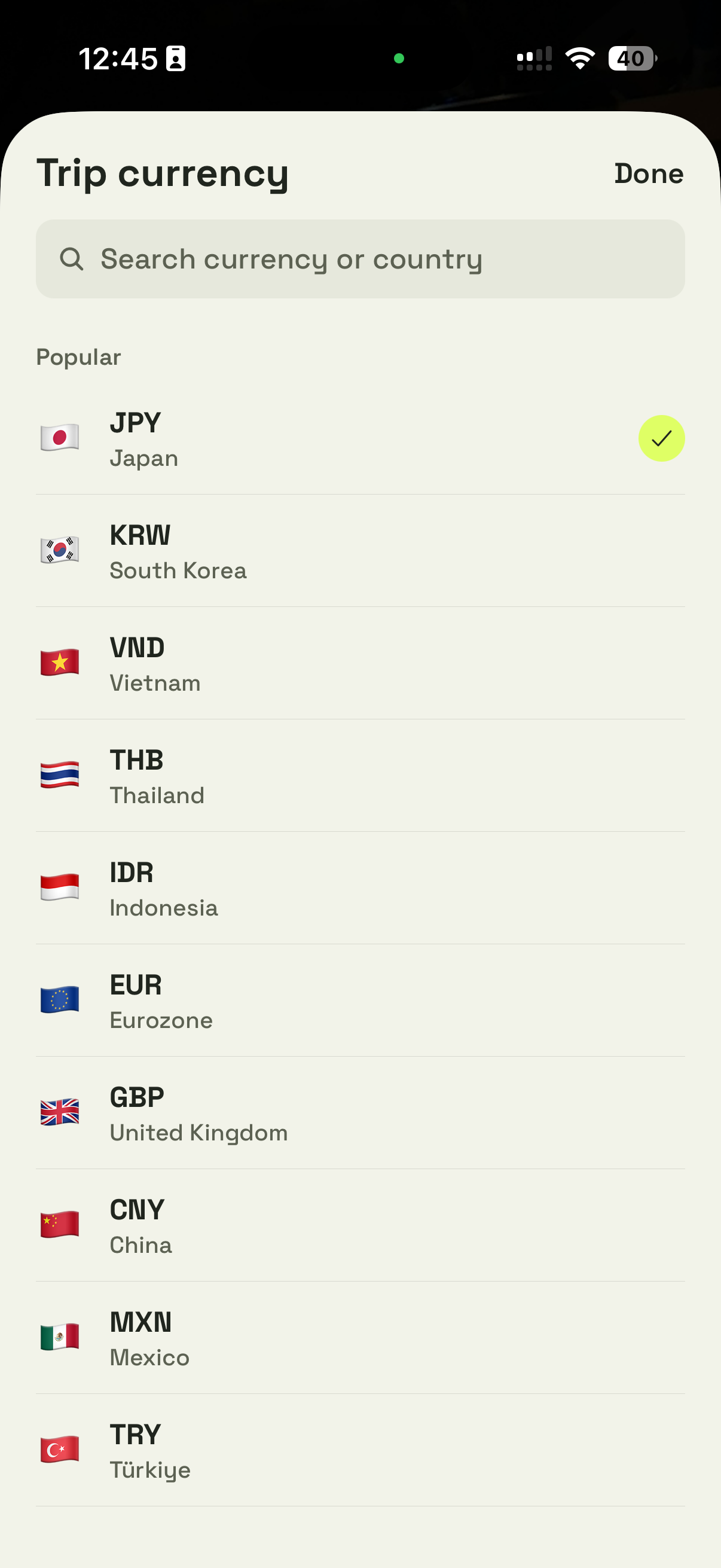
Pick your home and trip currencies. Search by currency or country when your plans change.
Tap the screen to view it at full size.
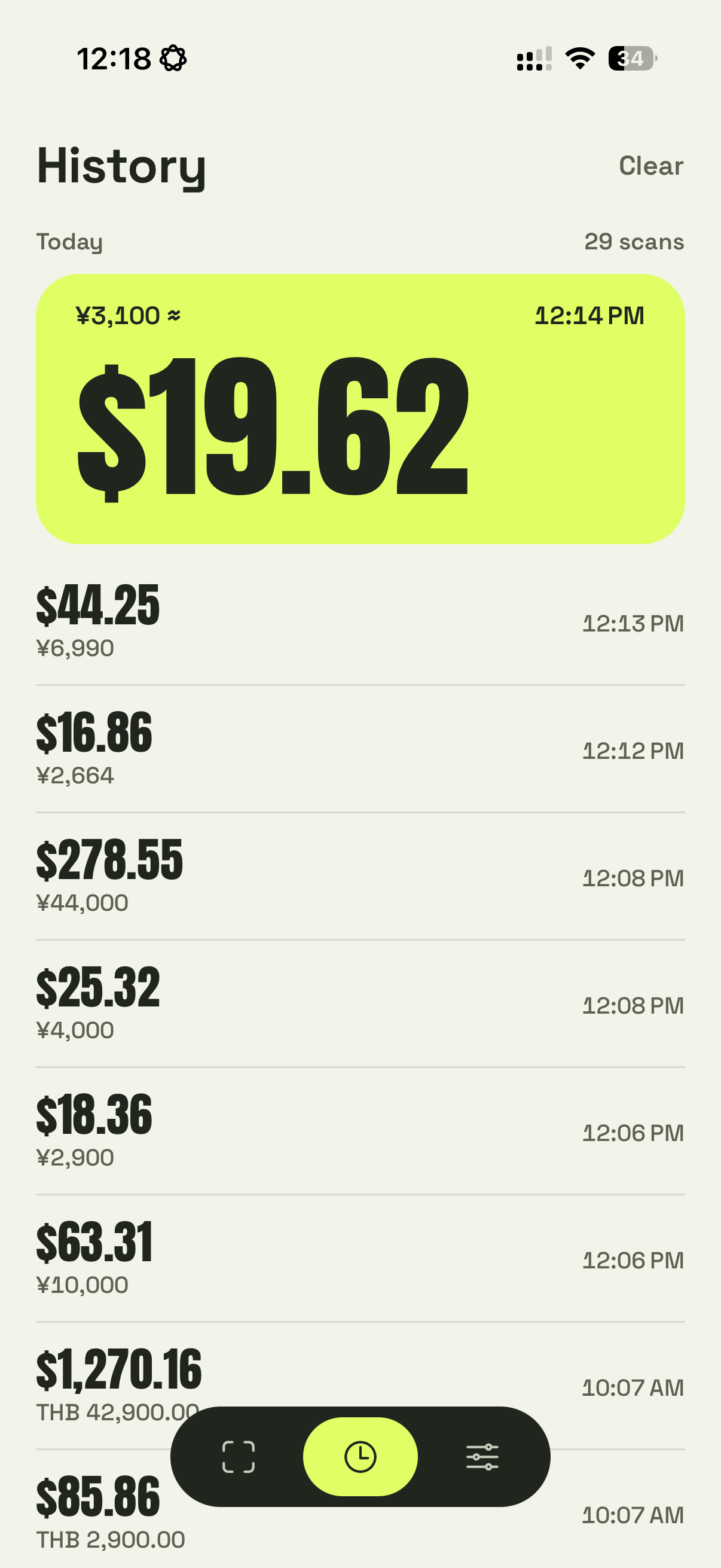
Recent camera scans stay in History on your phone. Revisit a price without scanning it again.
Tap the screen to view it at full size.
Screens show example amounts and dated rates. A receipt scan converts a printed amount; it does not add line items.
A new install includes reference rates. Kahei saves newer rates when you connect, so camera and typed conversions work offline. The rate date stays visible.
Camera images are read on your phone and are not uploaded. Settings and scan history are stored on the phone. No account is needed.
Camera privacy and SDK diagnosticsChoose your home and trip currencies in Settings or above the camera. Check the pair before scanning, especially for shared symbols such as $ and ¥ or prices without a currency.
Allow camera access and tap one clear printed price in the camera preview to focus and move the scan area. A conversion appears when Kahei reads it. Use the shutter for a still scan when needed.
Check the source amount, currency and rate date. Tap the conversion card with the pencil to fix a misread amount, or use the keypad to type a price. Estimates may differ from your card provider’s rates and fees.
Need help with a scan or an old rate? Read the support guide.
Check an estimate in your browser, print a currency wallet card, or read our field guides before you land.
Best currency converter apps for travel in 2026: 8 compared
We compared 8 travel currency apps on Nov 28, 2026: Kahei for reading price tags offline (we make it), Xe for sending money, Currency for typing amounts.
Is Thailand expensive? Real 2026 daily prices
No, Thailand is affordable in 2026. Researched baht and dollar costs for street food ($1.47 to $2.36), hotels, BTS Skytrain, Grab, temples, islands, and ATMs.
Is Bali expensive? What a trip actually costs in 2026
No, Bali is affordable in 2026. Researched rupiah and dollar costs for warung meals ($1.36 to $2.45), cafes, hotels, Grab, scooters, temples, and fees.
Should I pay in local currency or USD? (Dynamic currency conversion explained)
Always pay in the local currency, never USD, GBP, EUR or AUD. Choosing your home currency triggers Dynamic Currency Conversion (DCC) and adds 3% to 10%+ to your bill.
How much cash to bring to Japan in 2026 (ATMs, cards and IC cards)
Plan on ¥30,000 to ¥50,000 ($189 to $314) in cash for a week in Japan. Real 7-Eleven and JP Post ATM fees, cash-only spots, Suica rules and coin tips.
Is ¥1,000 a lot in Japan? What ¥1,000, ¥5,000 and ¥10,000 actually buy
¥1,000 is about $6.30, enough for a cheap lunch or a few drinks and snacks, not much else. Here is what ¥1,000, ¥5,000 and ¥10,000 buy in Japan in 2026.
Is Japan expensive? What a trip actually costs in 2026
No, Japan is cheaper than the US for most travelers right now. Real 2026 prices for meals, konbini snacks, Shinkansen, subways, hotels and temples.
Do prices in Japan include tax? Japan sales tax explained
Yes, posted prices in Japan must include tax since 2021. But many tags still show a before-tax price in bigger type. Here is how to read 税込, 税抜, the 10% and 8% rates, and discount stickers.
The Big Mac Index for travelers: where your money goes furthest in 2026
A Big Mac costs $9 in Switzerland and $2.50 in India. We ranked 30 countries by burger price so you can see where your travel budget stretches and where it doesn't.
Japan tax-free shopping in 2026: how the new airport refund works
Japan replaced instant tax-free discounts with an airport refund on November 1, 2026. Step-by-step rules, fees, and the Visit Japan Web Wi-Fi check at 7 major airports.
We ate our way through Japan for 10 days. Here's what every meal cost.
Real food prices in Japan from our November 2025 trip: a ¥400 ($2.50) pizza, ¥1,450 ($9) pork cutlet, ¥4,200 ($27) crab bowl, and 14 more meals with photos and receipts.
Kahei is a camera currency converter for iPhone and Android. Point at one printed price on a tag, menu or receipt to see an estimate in your home currency. You can also type an amount, convert offline with saved daily rates, and revisit camera scans in History.
Single-price scanning is free. No account is required.
Yes. Text recognition and conversion run on your phone. A fresh install includes a reference rate table. Connect and refresh in Settings to check for newer rates, which are saved on your phone. Check the displayed rate date before relying on an estimate.
Kahei converts one printed amount at a time, including a receipt total that is already printed. It does not add receipt line items or translate menu text.
Tap a price in the camera preview to focus on it and move the scan area. If Kahei misreads the number, tap the conversion card with the pencil to fix the amount. The pause button holds a reading; the play button resumes scanning.
Yes. Open the keypad from Scan to choose currencies and enter an amount. You can also choose Type an amount when camera access is unavailable. Typed conversions are separate from camera scans and are not saved in History.
Kahei uses daily European Central Bank reference rates through Frankfurter and calculates cross-rates. Currencies outside the ECB table use Frankfurter’s central-bank blend; AED uses its US dollar peg. These are reference estimates, not bank or card settlement rates.
Check the trip currency above the camera, especially for shared symbols such as $ and ¥ or prices without a currency. Clear symbols and currency codes can be detected automatically. If a scan is still wrong, open the keypad, choose the correct currencies and type the amount.
Camera images are processed on your phone and are not uploaded. Settings and scan history are stored in the app on your phone. Kahei downloads rates, and its text recognition SDK can send technical diagnostics. The privacy policy explains those requests and temporary still captures.
Kahei runs on iPhone with iOS 16 or later and on Android phones with Android 8.0 or later.
Read the privacy policy for camera processing and SDK diagnostics. Rate references: European Central Bank and Frankfurter.

Kahei
Free for iPhone and Android